| How'd
You Make Those Maps, Anyway?
Reaction to the cartography
in Uresia has been very favorable (they make nice
posters, too!), and enough people have asked me “how did you achieve
this effect or that?” or “where did you get the font used for such-and-such?”
that I decided to make a cartography tutorial part of Blue Lamp Road. While
I don't reveal every technique involved in making the maps, I hit most
of the important stuff.
The Fonts
Almost all of the fonts used in the Uresia maps are my
own creations. The runes, of course, are the Temphis
Runes (the specific runes on the maps are usually Temphis Sans
with some “weathering” effects added in Photoshop), available cheap from
Cumberland Games. The major
labels on the island maps (the names of kingdoms and the labels for the
watery divides) are in Atlas of the Magi, and most of the minor
labels (city names, locations in Shadow River, circled letters and numbers)
are in Apple Butter (modified slightly with Photoshop's “minimum”
filter to fatten it up a bit). Most of the titles are in Hultog.
The non-rune alphabet fonts are all available free at my Fontworks.
I've also got another commercial set, Uresia
Arcana, packed with pre-made mapping images.
The two fonts I used that aren't my own are Souvenir (for
the title of Rogan's Heath), a pretty common font bundled with several
graphics programs and at least one word processor I know of, and JSL
Ancient Italic. The JSL Ancient fonts (used for the italic subtitles
on the island and city maps) are available at
their creator's website, and they're utterly excellent antiqued fonts
available as free “emailware.”
Compasses, Lines & Elements
Almost all of the elements on the maps are hand-drawn.
While I used Photoshop to compose the elements into their final form, they're
made up of lots of little drawings I doodled and the scanned in. I kept
my lines loose and my attitudes looser to reflect the look I wanted: a
warped kind of age-of-sail mentality with little medieval and more modern
touches to give it a sense of being displaced in fantasy-time. In particular,
I made a conscious choice to avoid too much use of greyscale toning - all
of the details are either black or in a single, flat grey (the parchment
backgrounds are toned and shaded to the nines, of course, which provided
a nice contrast with the maps themselves). The only exception are the fading
navigation lines on the "rune guide" map. Not sure why
I made an exception there, except I just really liked the look of it and
decided that sticking too closely to my own rules would violate the Discordian
spirit of Uresia!
Some of the elements were drawn electronically, including the Rogan's
Heath rooftops and the street plan for Shadow River. The original vector-drawings,
though, don't much resemble the final maps, which were modified with hand-drawn
textures to give them a more natural look.
The Texture Trick
Most of the questions I get about the Uresia maps have
a single answer: “I did my favorite texture trick.” Photoshop can define
just about any image as a pattern, and patterns, in turn, can be
used as flood-fills and for other effects. If you speak Photoshop, the
following information will allow you to replicate the effect. If you don't
understand any of the terms, refer to Photoshop's help file or a good third-party
manual (please don't email me with questions unless you're sure you'll
understand the terms I use to answer)!
My favorite effect involves dropping from Grayscale to Bitmap mode and
applying a pattern in the process. All of the texture effects in the Uresia
maps (the lines in the sea, the hatching on the Rogan's Heath map, the
stippling in the Shadow River plan and more) were created using that one
technique applied with different patterns at different resolutions. The
trick behind the trick just amounts to developing the right grayscale shades
and choosing the right pattern to apply.
I've prepared a simple tutorial to teach you how to create and apply
your own texture patterns. This handy trick has hundreds of applications,
so fire up Photoshop (just about any recent version) and follow along.
Begin by downloading
this file; it contains a simple map image in 300dpi grayscale. This
is a lot like what the Uresia island maps looked like before I textured
them: white areas for the islands, and a heavy blur to gray for the oceans.
All we need to do now is to create a pattern, and apply it as a texture.
Step One: Create a new file in Photoshop.
It should be a 300dpi grayscale image, 300 pixels on a side (1 inch by
1 inch), with a white background.
![[Image of Step Two]](step-two.gif) Step
Two: Using a black paintbrush (any you like, but from 4-12 pixels
wide and very soft is ideal) start drawing lines in the middle of
the white box. Do not under any circumstances allow the brush to touch
the sides of the box. It's okay if the lines are rough and wobbly;
it's okay if they overlap one another. The only thing that isn't okay is
for any of them to touch the edges of the image, even a little. Draw three
or four lines before proceeding to Step Three. Step
Two: Using a black paintbrush (any you like, but from 4-12 pixels
wide and very soft is ideal) start drawing lines in the middle of
the white box. Do not under any circumstances allow the brush to touch
the sides of the box. It's okay if the lines are rough and wobbly;
it's okay if they overlap one another. The only thing that isn't okay is
for any of them to touch the edges of the image, even a little. Draw three
or four lines before proceeding to Step Three.
Step Three: Apply an Offset filter
to the image: 150 pixels horizontal and 75 pixels vertical. Make sure it's
set to “wrap around.” This will make some of your lines overlap the edges
seamlessly.
![[Image of Step Four]](step-four.gif) Step
Four: Repeat steps Two and Three. Draw some lines in the middle
of the image (don't touch the edges!) and then apply the offset again.
Rinse, lather, repeat. Keep doing this until you're happy with the pattern.
As long as you never touched the edges, it's a seamlessly tiling image. Step
Four: Repeat steps Two and Three. Draw some lines in the middle
of the image (don't touch the edges!) and then apply the offset again.
Rinse, lather, repeat. Keep doing this until you're happy with the pattern.
As long as you never touched the edges, it's a seamlessly tiling image.
Step Six: In the edit menu, define
the image as a pattern. Give the pattern any name you like (and at some
point, you'll probably want to save the file so you can re-create the pattern
later on if you reinstall Photoshop or remove the pattern from the pattern
menu).
Step Seven: Open up the “simplemap”
file. Choose Image>Mode>Bitmap from the menu. Choose “custom
pattern” as the method, and select your pattern from those provided
(it'll be the last one there). Note that the image starts out at 300dpi,
but you'll probably want a higher resolution for your bitmapped version.
Try 900dpi as a starting point, and click OK.
![[Maybe it looks like this]](simple-done.gif) Voila!
The map has gone from a blur to a sort of sketch. Try different resolutions
for the bitmap to improve the look of it. If 900dpi still looks too coarse,
try 1200. If 900 dpi looks too fine and grainy, try 600, and so on. Fiddle
to get what you like. If you don't like any of it, just make a different
pattern and begin the process again. It took me a while to get patterns
I really liked (I hoard the ones I've made jealously). Voila!
The map has gone from a blur to a sort of sketch. Try different resolutions
for the bitmap to improve the look of it. If 900dpi still looks too coarse,
try 1200. If 900 dpi looks too fine and grainy, try 600, and so on. Fiddle
to get what you like. If you don't like any of it, just make a different
pattern and begin the process again. It took me a while to get patterns
I really liked (I hoard the ones I've made jealously).
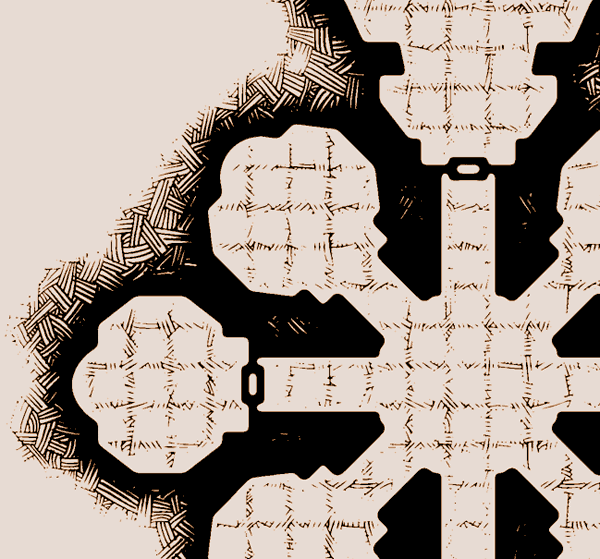
The Uresia island maps (with the “woodcut ocean” effect) were created
using a simple pattern of horizontal lines like the one shown above. The
same trick with a nice earth-hatch pattern can make a great effect on dungeon
maps, and so forth. You can get fancy, too: the rooftops in Rogan's
Heath started out as flat areas of gray which I separated into different
layers, applied line filters to (the same filter that made the oceans,
canted in different directions) and then re-composed as a single layer.
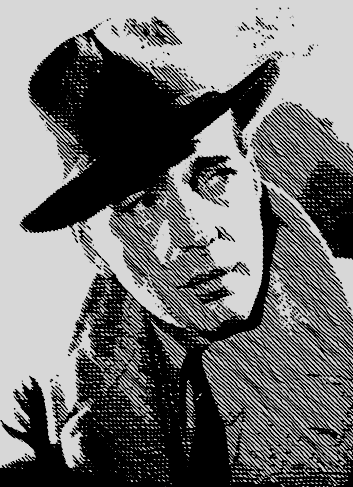
Similar tricks can be applied to photographs,
even, to give them a much more convincing “sketched” look than any pre-made
filter I know.
Yes, this means that those nifty oceans took seconds to make
once I had the pattern done and once I settled on the right degree of blur
and darkness for the oceans. It's those damned labels that took
hours! Such is the often freakish-nature of graphic design. Some final
hints for using the bitmap-to-a-pattern trick:
- Keep fiddling. The perfect pattern, the perfect resolution, the perfect
grey tones - these are all elusive things demanding trial and error. Experiment
with posterizing the image before bitmapping it to create cool “falling
off” effects.
- Soft and blurry patterns give Photoshop more leeway in making apparent
gradients in the bitmap, reflected by the thicker and thinner lines on
the Uresia maps. When in doubt, make your patterns from soft brushes.
- Always restore your mode to grayscale before resizing the image or
doing any other effects with it; Photoshop can't resample bitmap images;
it can only resize them very crudely.
- You don't have to use tiling patterns. If you have a pattern
the same size as (or larger than) your target image (scaled according to
the final bitmap's resolution) you can apply it whole-cloth (this also
allows you to blur the pattern directly without messing up any tiling).
Good sources of patterns include scanned cloth and canvas, or good old-fashioned
acetate patterns available from some old-school drafting supply shops (I
used a couple of these in Uresia, including the classic forest pattern
seen in the background of the city maps).
I used my entire (relatively humble) bag of tricks to make the Uresia
maps, but I've now revealed the stuff that's most important by far . .
. Use them in good health, and if you make any cool new Uresia-related
maps with 'em, let me know!
|
![[Click to Return to Blue Lamp Road]](bluelamp-side.gif)